How To
How Do I Split a Check by Item From a Receipt?
The simplest workflow for splitting a restaurant check by item from a receipt photo, including shared dishes, tax, tip, and repayment.
Quick answer: To split a check by item from a receipt, scan the receipt, let each person claim their rows, split any shared dishes, and review the totals before paying. TabChop is built around exactly that sequence.
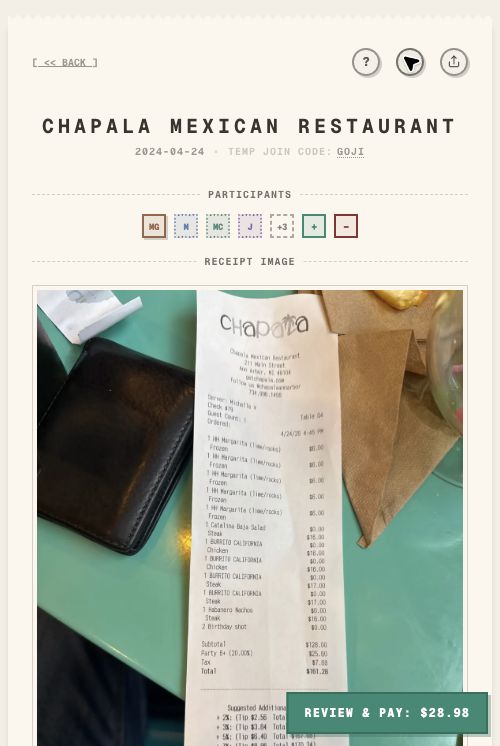
To split a check by item from a receipt, scan the receipt, review the line items, invite the group, and let each person claim what they ordered. TabChop is built for that scan-to-claim workflow.
This is cleaner than typing every dish into a calculator because the receipt stays visible while the group assigns items.
Short answer
The fastest way to split by item is:
- Upload or scan the receipt.
- Confirm the parsed items.
- Share the split with the group.
- Let people claim their items.
- Split shared dishes across the right people.
- Use the final totals to pay the host back.
Why itemized splitting beats even splitting
Even splitting is fast, but it is not always fair. It works when everyone ordered roughly the same amount. It feels wrong when one person had a salad and water while another person had steak, cocktails, and dessert.
Itemized splitting works better for:
- Different entree prices
- Alcohol versus no alcohol
- Shared appetizers
- Kids' meals
- Couples sharing some items but not others
- People who left early or joined late
How TabChop handles the receipt
TabChop starts from the receipt photo and turns it into a live itemized view. The host can review the rows, then share the receipt so everyone can participate from their own phone.
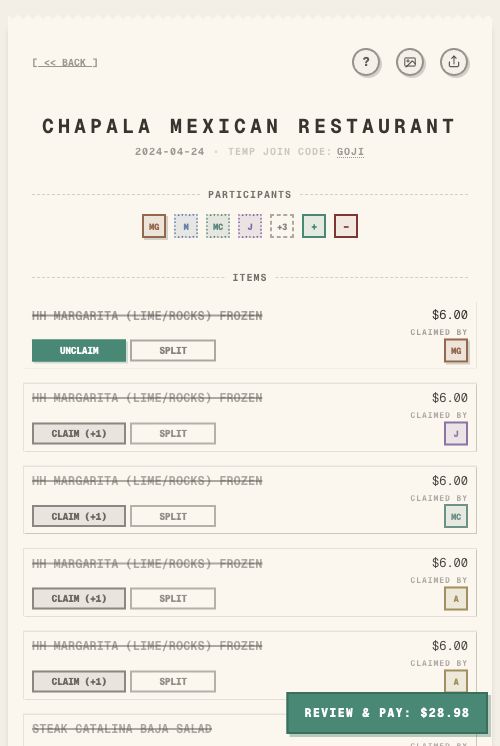
The important part is that the receipt remains the source of truth. People are not guessing from memory or rebuilding the order in a group chat.
How should shared items be split?
Shared items should be assigned only to the people who actually shared them. A table appetizer does not always belong to everyone, and a shared dessert may only belong to two people.
A practical rule:
| Shared item | Best split |
|---|---|
| Appetizer for the whole table | Split across everyone who ate it |
| Bottle of wine | Split across drinkers only |
| Dessert for two | Split across those two people |
| Family-style side | Split across the people who ordered it |
What about tax and tip?
Tax and tip should follow the receipt total instead of being guessed later. A good bill-splitting workflow keeps the item totals, tax, tip, and final amount in view so the host does not have to explain the math after dinner.
When people can see the final total tied back to the receipt, repayment feels less awkward.
Quick FAQ
How do I split a check by item from a receipt?
Scan the receipt, review the parsed rows, share the split, and let each person claim their items. Use shared-item splitting for appetizers, drinks, or desserts.
Is itemized splitting better than splitting evenly?
Itemized splitting is better when people ordered different amounts. Even splitting is fine when everyone ordered about the same thing.
Can I split shared appetizers?
Yes. Shared appetizers should be split across the people who actually shared them, not automatically across the entire table.
Keep the receipt in the workflow
The easiest itemized split keeps the receipt visible, the item claims clear, and repayment connected to the final totals.
Key takeaways:
- Start with the receipt photo.
- Let people claim their own rows.
- Split shared items intentionally.