Split Check Guide
How to Split a Check With Friends
A simple way to split a check with friends: scan the receipt, invite everyone, claim items, split shared dishes, and settle up.
Quick answer: To split a check with friends, use the receipt itself: scan it, invite the group, have everyone claim their items, split shared dishes, and pay from personal totals. TabChop makes that whole process visible on one shared receipt.
If you are searching how to split a check with friends, you probably do not want a spreadsheet. You want the bill handled before people leave the table, without asking everyone to install something new for one meal.
The cleanest flow is simple: scan the check, invite the group, let everyone claim what they ordered, and settle from the final personal totals.
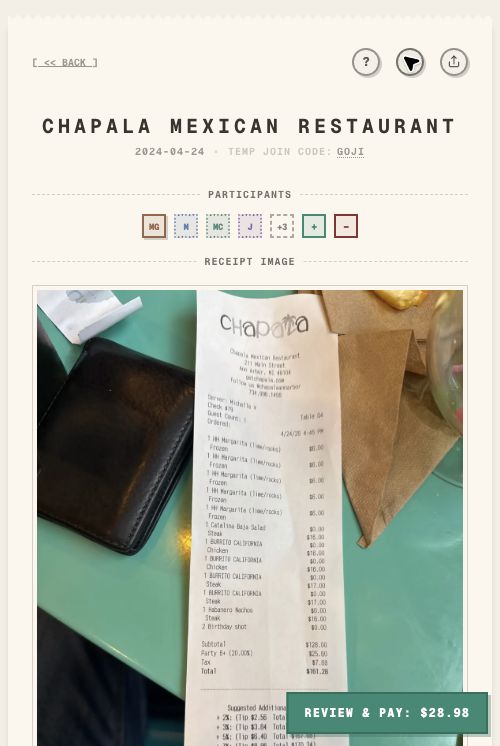
The old way is where the awkwardness starts
Most groups fall into one of three habits:
- Split everything evenly, even when orders were not even.
- Ask one person to do all the math.
- Send a photo of the check and sort it out later.
Those can work, but they create friction. Someone overpays, someone underpays, and the host has to chase people down.
Step 1: Turn the check into a shared receipt
Start by scanning the receipt instead of manually typing every item. TabChop turns the photo into itemized rows with prices, tax, tip, and total.
That gives everyone the same source of truth. The conversation changes from "what was my share?" to "which rows were mine?"
Step 2: Invite everyone while the order is fresh
The best time to split a check is right after the receipt arrives. People still remember what they ordered, and the host does not have to reconstruct the meal later.
Use a link, QR code, or guest entry so the group can join quickly. That browser-first path matters because the split gets easier when participation starts before account setup becomes a side quest.
Step 3: Claim personal items
Each person claims their own rows. If you had the burger and fries, claim those. If someone else had a drink, leave it for them.
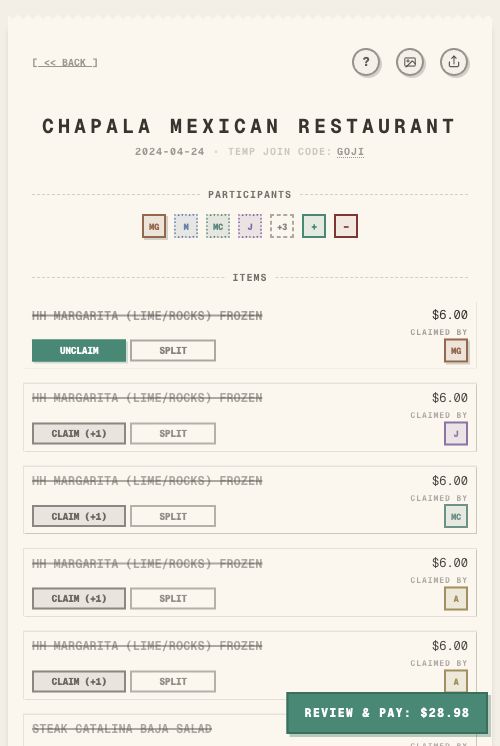
This is the part that makes itemized splitting feel fair. Everyone can see what belongs to them before payment starts.
Step 4: Split shared items
Shared food should be explicit. Open the split controls for appetizers, desserts, bottles, or family-style dishes and assign the people who shared them.
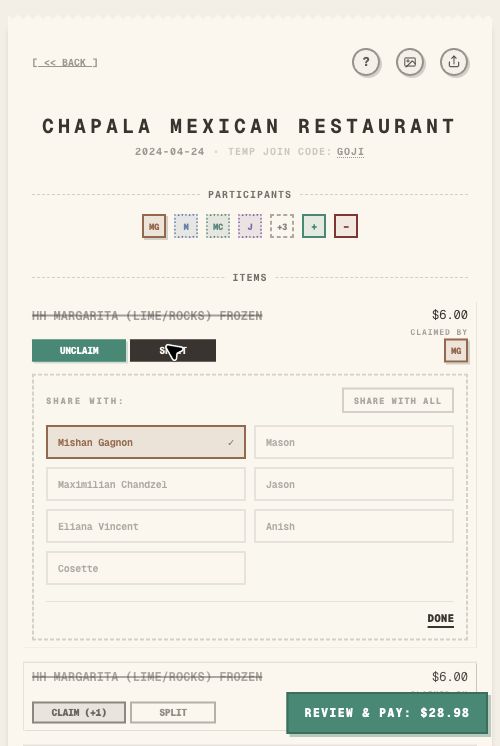
This avoids the common problem where one shared item quietly gets pushed onto the host.
Step 5: Settle from personal totals
Once the rows are claimed, each person has a personal total. That total is the amount they should pay back to the host, with the payer’s preferred repayment method already attached to the flow.
Before collecting payment, check for:
- Unclaimed items
- Shared items assigned to the wrong people
- Tax and tip included in the final total
- Any total that looks obviously off
Common mistakes
Waiting until later
Later usually means the host does the work alone. Split the check while everyone is still present.
Letting one person estimate every share
Estimates are fast, but they are hard to defend. Item claims make the split visible.
Forgetting tax and tip
The item subtotal is not the final total. Make sure tax and tip are included before people pay.
Quick FAQ
What is the easiest way to split a check?
For a group meal, scan the receipt, let people claim items, split shared dishes, and pay from the resulting personal totals.
Is equal split ever okay?
Yes, if everyone ordered roughly the same amount and agrees. If orders were uneven, itemized splitting is usually better.
Do all friends need an account?
No. TabChop supports guest-friendly flows so people can participate without slowing the host down.
Split the check while it is still easy
The best split is the one that happens before memory fades and people disappear into the group chat.
Key takeaways:
- Scan first so nobody types the full check.
- Claim personal items before payment.
- Split shared dishes visibly.