Receipt Scanning
Receipt Scanner for Splitting Bills
See how TabChop turns a receipt photo into itemized rows your group can claim, split, and settle from.
Quick answer: A receipt scanner for splitting bills should turn a photo into a usable group split, not just extract text. TabChop parses the receipt, then lets people claim rows and pay from exact personal totals.
If the receipt is still paper, the split usually starts with someone doing math on a phone. A receipt scanner for splitting bills changes that first step: take the photo once, turn the rows into a live split, and let the group handle their own items.
TabChop is built around that handoff from messy receipt to claimable split.
Why receipt scanning matters before the split
Most bill-splitting friction happens before anyone pays:
- The host has to read every line item.
- Someone has to remember who ordered what.
- Tax and tip get treated as an afterthought.
- Shared items get rounded in whatever way feels fastest.
When the receipt scanner does the first pass, the group starts from structured information instead of a photo buried in a group text.
What TabChop extracts from the photo
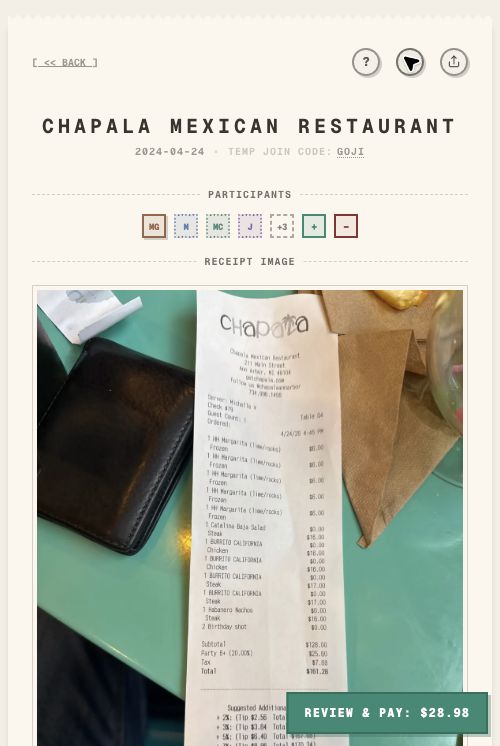
The parsing flow is designed for real receipts, not perfect examples. In the overview demo, a receipt photo becomes:
- Merchant name and date
- Item names
- Quantities
- Line prices
- Subtotal
- Tax
- Tip
- Final total
That gives the host a clean foundation before anyone starts claiming food, drinks, or shared dishes.
From scanned receipt to live receipt
The useful part is not just reading text from an image. It is what happens next.
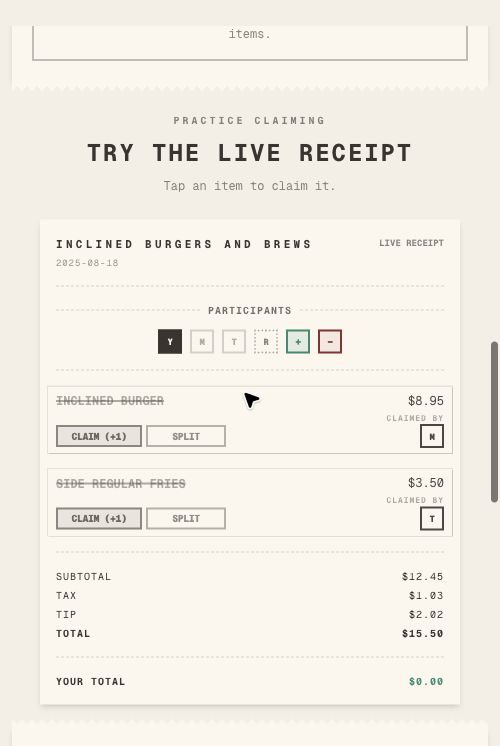
Once parsing finishes, TabChop turns the receipt into a live itemized view. Each row can be claimed, split, or left open until the right person taps it. The group sees a shared version of the same receipt instead of passing one phone around.
When a receipt scanner beats manual entry
A receipt scanner helps most when the bill has more than a few lines:
- Group dinners with uneven orders
- Coffee runs with several custom items
- Grocery trips where roommates split only some items
- Bar tabs where drinks and food belong to different people
- Shared appetizers, desserts, or sides
Manual entry can work for a tiny receipt. For a real group tab, scanning keeps the first step from becoming the whole job.
Practical workflow for hosts
Use this flow when you are the person who paid:
- Open TabChop and start a split.
- Upload the receipt photo.
- Review the parsed rows.
- Invite the group while the orders are still fresh.
- Ask everyone to claim their items.
- Confirm the final totals before collecting payment.
The goal is simple: scan once, then let each person handle their own share.
Common mistakes
Waiting until everyone leaves
Receipt scanning is fastest when people still remember what they ordered. Share the split while the group is still together.
Treating the scan as final without review
Receipts can be crumpled, cropped, or faded. Use the scan to save time, then quickly check key totals before asking people to pay.
Forgetting shared items
Scanning creates the rows. The group still needs to mark shared appetizers, bottles, sides, or desserts as split items.
Quick FAQ
Does TabChop only work for restaurant receipts?
No. The overview demo includes both restaurant and grocery-style receipts, because itemized splitting is useful anywhere one person pays for multiple people.
Do people need to type in every item?
No. The receipt scanner creates the item rows first, then participants claim or split those rows.
Can I try it before making a real split?
Yes. The product overview includes a live parsing demo you can use before starting your own receipt.
Start with the photo
A good split starts with a clean source of truth. With TabChop, that source is one receipt photo turned into rows the group can actually use.
Key takeaways:
- Scanning removes the slowest manual step.
- Parsed rows make item-level claiming possible.
- Totals stay visible while the group settles up.