Guest Splitting
Split a Bill With Guests
Use links, QR codes, and offline guests to keep a receipt split moving even when not everyone joins on their phone.
Quick answer: To split a bill with guests, the system has to work even when some people do not create accounts. TabChop supports share links, QR access, and offline guests so the receipt can still be divided cleanly.
The fastest bill split is the one everyone can join. But real groups are messy: someone has low battery, someone does not want another account, and someone already walked outside.
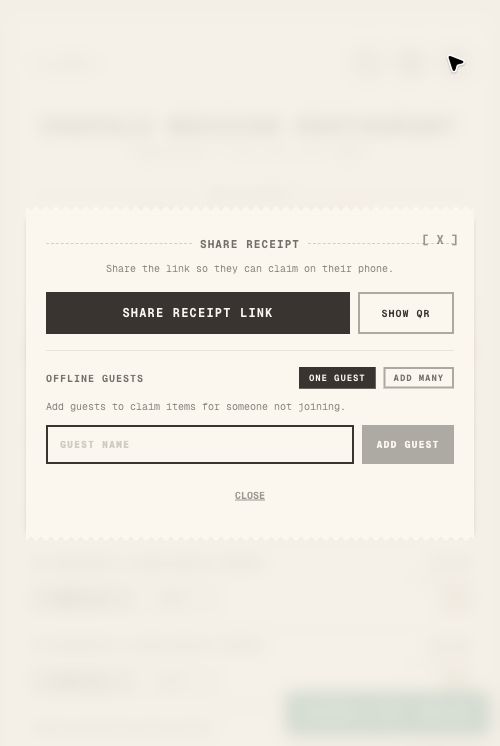
TabChop gives hosts a practical way to split a bill with guests using share links, QR handoff, and offline guest entries. That guest path is not a stripped-down side door; it is how the product keeps real groups moving when a full signup would be overkill.
Why guest-friendly splitting matters
Payment delays usually come from participation friction, not math. The split stalls when one person cannot join, does not know where the link is, or needs the host to add their items manually.
A guest-friendly receipt split gives the host more than one path:
- Share a link
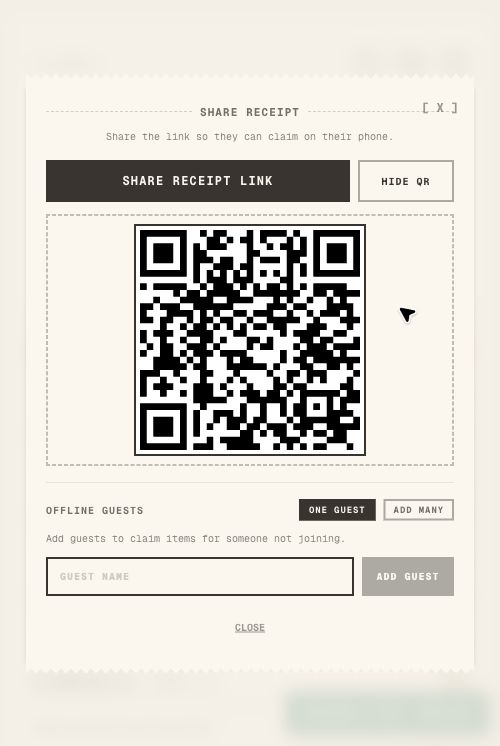
- Show a QR code
- Add an offline guest
- Keep item claims visible for the group
That flexibility keeps dinner from turning into a long admin session, while the host can still bring everyone back to one clean payment summary afterward.
Share the receipt link first
The simplest flow is still the best one. Open the share modal and send the receipt link to the group chat.
That lets people open the same split from their own phone and claim their own rows. It also gives the host a single source of truth instead of scattered text messages.
Use QR when everyone is at the table
QR is useful when the group is physically together. Instead of asking people to search the chat, the host can show a code and let everyone join from the table.
This works especially well at:
- Restaurants
- Bars
- Cafes
- Group trips
- Shared grocery runs
The less typing people have to do, the faster the receipt gets claimed.
Add offline guests when someone cannot join
Sometimes a person is part of the split but not part of the live flow. They may be driving, have a dead phone, or simply prefer that the host handles it.
Offline guests solve that. The host can add a guest name and assign items for that person without blocking everyone else, then still include that person in the same final totals as everyone who joined live.
Keep guest items auditable
Guest support only works if the receipt stays understandable. In TabChop, participant chips and claimed rows make it clear who is attached to each item.
That means the host can still answer the important questions:
- Who has this item?
- Which items are unclaimed?
- Which rows are shared?
- What does each person owe?
Practical workflow for mixed groups
Use this when some people join and others do not:
- Scan the receipt.
- Share the link in the group chat.
- Show the QR code for anyone nearby.
- Add offline guests for people who cannot join.
- Assign their items manually.
- Review totals before asking for payment.
The host stays in control without doing every person's math from scratch.
Common mistakes
Assuming everyone will join immediately
Some people will not. Give them a link or QR first, then add them as guests if needed.
Leaving offline guests unnamed
Use recognizable names so everyone understands the assignments later.
Waiting to add guests until the end
Add missing people early. It is easier to claim rows when all participants are visible.
Quick FAQ
Do guests need an account?
No. The workflow is designed so the host can include people who are not fully signed in.
Can one phone manage the split?
Yes. The host can add offline guests and assign items when someone cannot join on their own device.
Is QR better than a link?
QR is best in person. A link is best when the group is already in a chat thread.
Keep the group moving
The point of guest support is momentum. People should be able to join quickly, and the host should have a fallback when they cannot.
Key takeaways:
- Share links work well for group chats.
- QR works well at the table.
- Offline guests keep non-joiners included.