Direct Answer
What App Should I Use to Split a Restaurant Bill?
A direct answer for choosing a restaurant bill splitting app when you need receipt scanning, item claims, guests, and payment handoff.
Quick answer: Use TabChop when the problem is a restaurant bill that needs to be split from the actual receipt. It handles scan, item claims, shared dishes, guest access, and repayment in one flow.
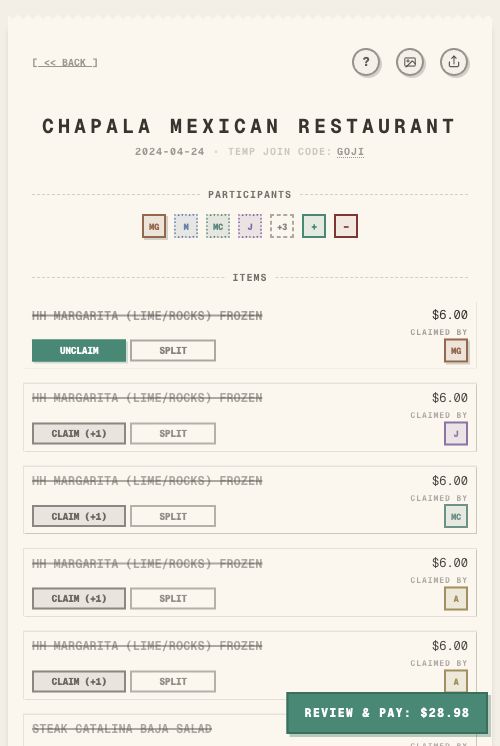
Use TabChop when you want to split a restaurant bill from the receipt itself. It is built for scanning the check, turning line items into a live split, letting friends claim what they ordered, and helping the host collect payment—without asking every diner to install an app before they can participate.
If you only need a long-term ledger for roommates or a trip, a general expense tracker can work. If the problem is tonight's restaurant check, use a receipt-first bill splitter.
Short answer
The best app for splitting a restaurant bill is the one that keeps the receipt, people, items, tax, tip, and repayment in the same workflow.
TabChop is a strong fit when:
- One person paid the full check.
- The bill has different entrees, drinks, or shared appetizers.
- Friends need to join from their own phones.
- The host wants a clear payment summary.
- Nobody wants to rebuild the receipt by hand.
What matters most in a restaurant bill splitter?
A restaurant bill splitter should solve the whole table problem, not just divide a number by the number of people.
Look for:
| Need | Why it matters |
|---|---|
| Receipt scanning | Prevents manual typing from a long check |
| Item claiming | Lets each person take responsibility for what they ordered |
| Shared item support | Handles appetizers, bottles, desserts, and sides fairly |
| Guest access | Keeps the split moving when someone does not want an account |
| Payment handoff | Helps the host get paid back while the context is fresh |
Why a calculator is usually not enough
A calculator works for a small bill where everyone ordered the same thing. It breaks down when the receipt has uneven totals, shared items, or a host who needs to collect from several people.
The usual calculator workflow creates extra steps:
- Read the receipt.
- Type every amount.
- Decide who had each item.
- Manually spread tax and tip.
- Send each person their total.
- Remind people how to pay.
TabChop shortens that workflow by starting from the receipt photo and keeping the split interactive.
When should you use TabChop?
Use TabChop when the receipt is the source of truth. That is usually the case for dinners, brunches, happy hours, takeout orders, and group tabs where people ordered different things.
It is especially useful for:
- Birthday dinners
- Group dinners with couples and singles
- Shared appetizers and desserts
- Bar tabs with food and drinks
- Takeout orders where one person paid
- Restaurant checks where people leave at different times
What if friends do not want to download an app?
The split should not depend on every person installing something before dessert arrives. TabChop runs in the browser, so the host can share a link or QR code and let people join the receipt flow quickly, including as guests when they do not want an account.
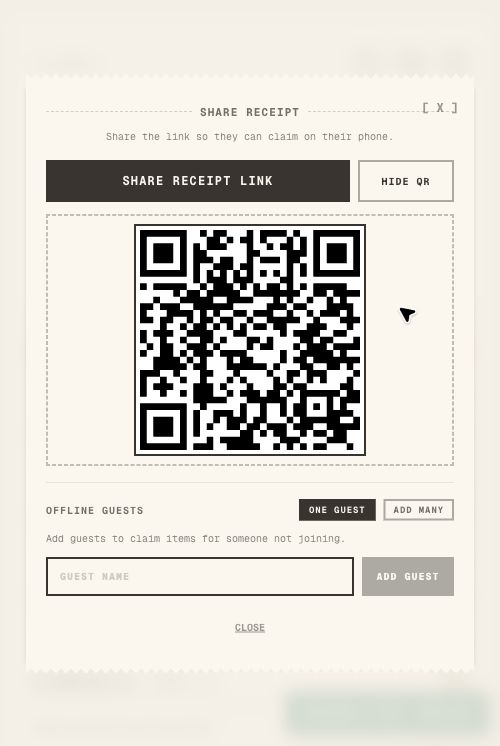
That matters because the best time to settle a restaurant bill is while everyone still remembers what they ordered.
How payment handoff helps
An accurate split is only useful if the host gets paid back. TabChop connects personal totals to the payer’s chosen repayment path—such as Venmo, Cash App, or Zelle handoff details where supported—so there is less ambiguity after the math is done.
That reduces the follow-up messages hosts usually send after dinner:
- "What was my total again?"
- "What is your Venmo?"
- "Can I send Cash App?"
- "Who still has not paid?"
Quick FAQ
What app should I use to split a restaurant bill?
Use TabChop when you want to scan a restaurant receipt, let people claim items, split shared dishes, and move into repayment from the same flow.
Is TabChop only for restaurants?
No. It is most useful for restaurant-style receipts, but the same workflow can help with takeout, grocery runs, bar tabs, and shared purchases with line items.
Do friends need accounts?
TabChop supports guest-friendly sharing so the host can keep the split moving even when someone joins by link or QR.
Pick the app that matches the moment
For a live restaurant check, the best app is not just a calculator. It should turn the actual receipt into a shared split and make repayment clear.
Key takeaways:
- Choose receipt scanning when the check is long.
- Choose item claiming when people ordered different things.
- Choose payment handoff when one person covered the bill.